Agentic AI · Systems Design

What goes in front
of the model, matters.

Context engineering is the discipline of deciding exactly what an LLM or agent sees at the moment it reasons — the instructions, the memory, the retrieved facts, the tools — so that a fixed, finite window produces a reliable answer instead of a confident guess.

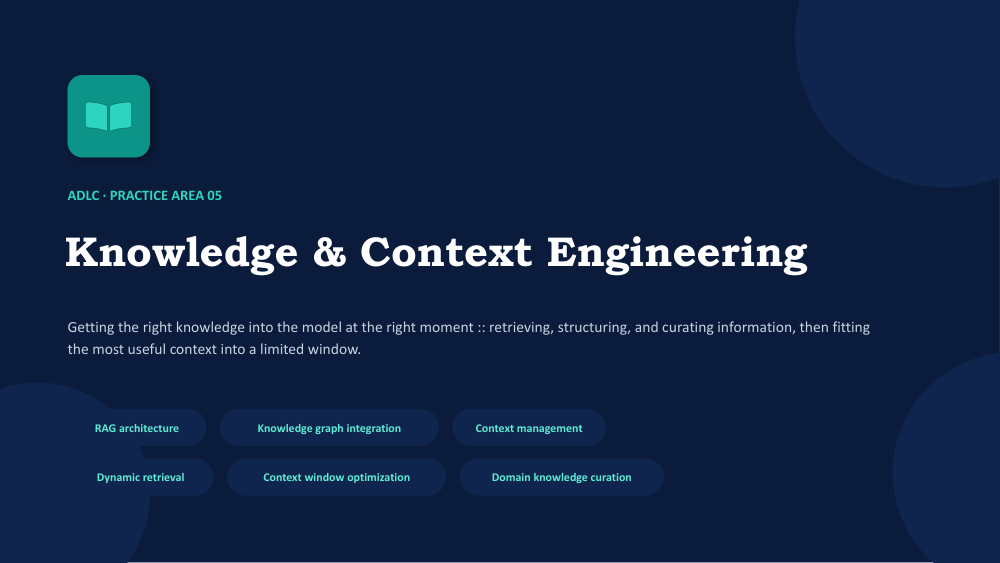
SLIDE 01 — KNOWLEDGE & CONTEXT ENGINEERING Cover slide: Knowledge and Context Engineering
Quick answer

Context engineering is the practice of curating and assembling everything a model sees at inference time — system instructions, the user's request, short- and long-term memory, retrieved knowledge, and available tools — so an agent reasons with exactly the right information, no more and no less. It differs from prompt engineering, which crafts a single instruction; context engineering manages the entire information lifecycle across a multi-step, often multi-session task. The most cited operating framework, popularized by LangChain, breaks the discipline into four moves: Write (save context for later), Select (pull in only what's relevant now), Compress (fit more meaning into fewer tokens), and Isolate (keep unrelated context from contaminating a task).

SLIDE 02 — CONTEXT VS. PROMPT ENGINEERING Diagram comparing prompt engineering and context engineering
A shift in scope, not just vocabulary

Bigger than a well-written prompt

Prompt engineering is about wording a single instruction well — the phrasing, the examples, the format request. It's a craft applied to one message at a time.

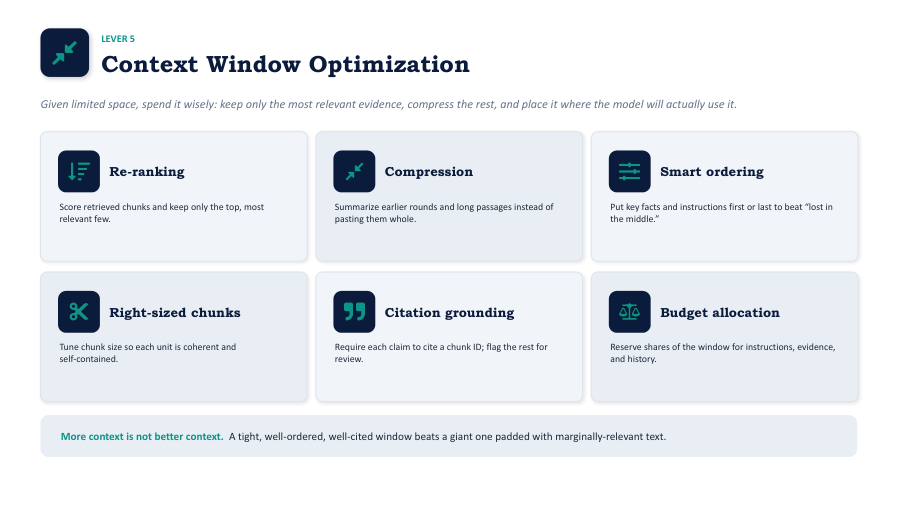
Context engineering is architectural: it treats the entire information lifecycle — selection, retrieval, filtering, construction, compression, evaluation, and refresh — as a system that has to keep working across an agent's whole task, not just its first message. A perfectly worded prompt still fails if the agent is missing the one document it actually needed, or if it's drowning in a hundred documents it didn't.

SLIDE 03 — THE CONSTRAINTS THAT MAKE IT HARD Four constraints of context engineering: tokens, cost, relevance, state
Why this became its own discipline

Four pressures pushing back

  • Token limits — even generous context windows are finite, forcing hard choices about what fits.
  • Cost — every token processed costs money; careless context bloat compounds into real budget.
  • Relevance — irrelevant information doesn't just waste space, it actively distracts and degrades reasoning quality.
  • State persistence — agents need to remember user preferences and prior turns across sessions, not just within one.
Anatomy of a context window

Everything competing for the same budget

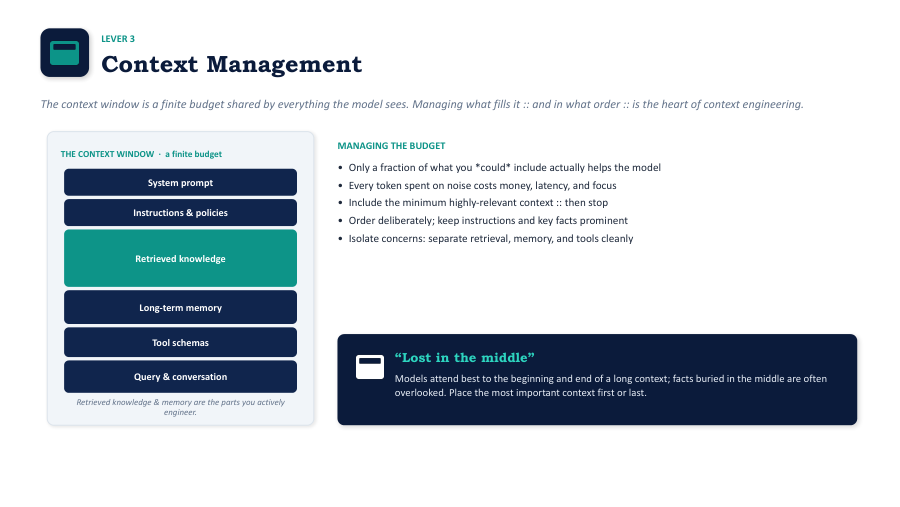
Think of a context window like a packing list for a task: instructions, the question at hand, recent notes, trusted facts, and the tools available. Every one of these categories draws from the same finite token budget.

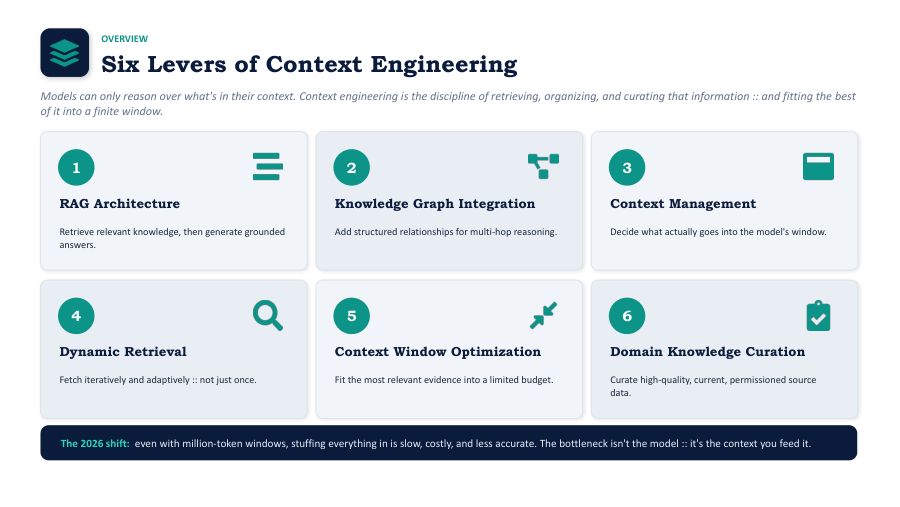
SLIDE 04 — SIX TYPES OF CONTEXT Six types of context in an agent's context window
A sample token allocation

Where the budget typically goes

Instructions User request Retrieved knowledge Memory Tools & state
15%
10%
45%
20%
10%

A typical knowledge-heavy agent task — retrieved documents alone can claim nearly half the window, which is exactly why selection and compression matter more than raw window size.

The operating framework

Write, Select, Compress, Isolate

Four moves, popularized by LangChain's agent-engineering research, that cover nearly everything a context-engineered system has to do to stay reliable as tasks get longer and more complex.

SLIDE 05 — THE FOUR-PILLAR FRAMEWORK Write, Select, Compress, Isolate context engineering framework
One system, four responsibilities

Four verbs, one context budget

Each pillar answers a different failure mode — losing information, drowning in it, running out of room, or letting unrelated tasks bleed into each other.

✍️
Write

Save intermediate findings outside the active window — a scratchpad the agent can read back from later, so nothing important is lost when the window rolls over.

🎯
Select

Pull in only what's relevant to the current step. Not every stored fact deserves a seat in the window — retrieval should be as selective as it is thorough.

🗜️
Compress

Summarize or restructure verbose content so more meaning fits in fewer tokens, without losing the details a later step will need.

🧱
Isolate

Keep unrelated context — a different sub-task, a different user, a different document set — from contaminating the current reasoning step.

SLIDE 06 — THE KNOWLEDGE LAYER Vector databases and RAG as the knowledge layer for context engineering
Where 'select' actually happens

Retrieval turns a library into a lookup

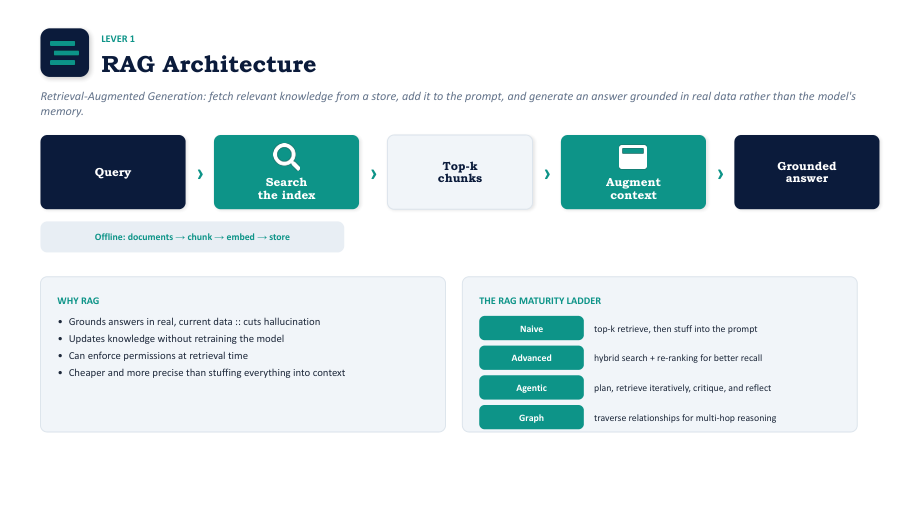
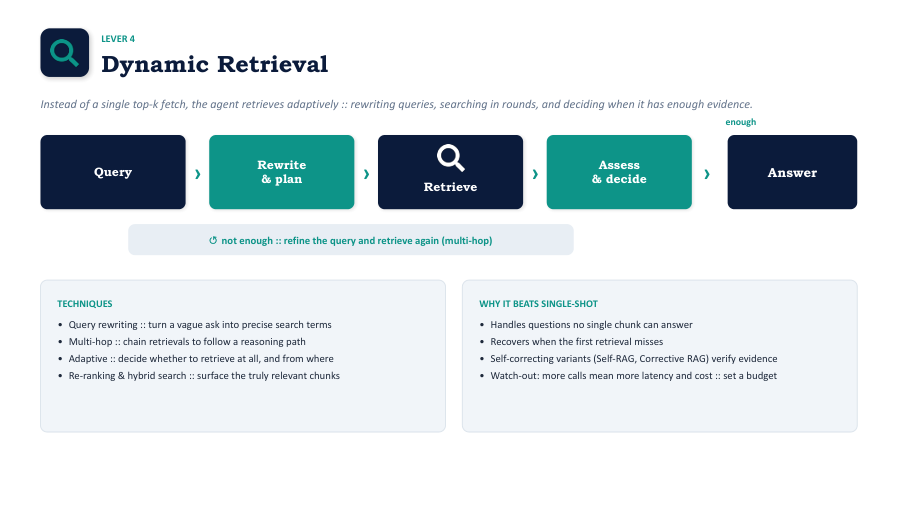
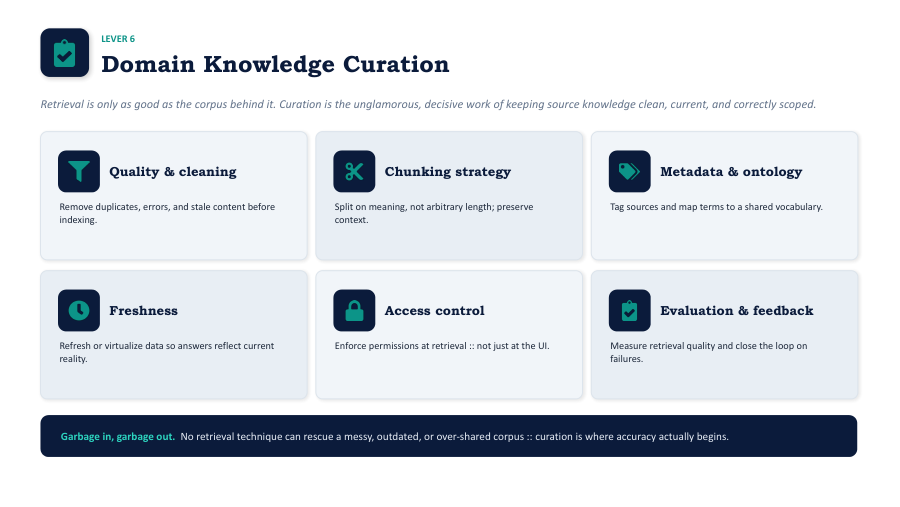
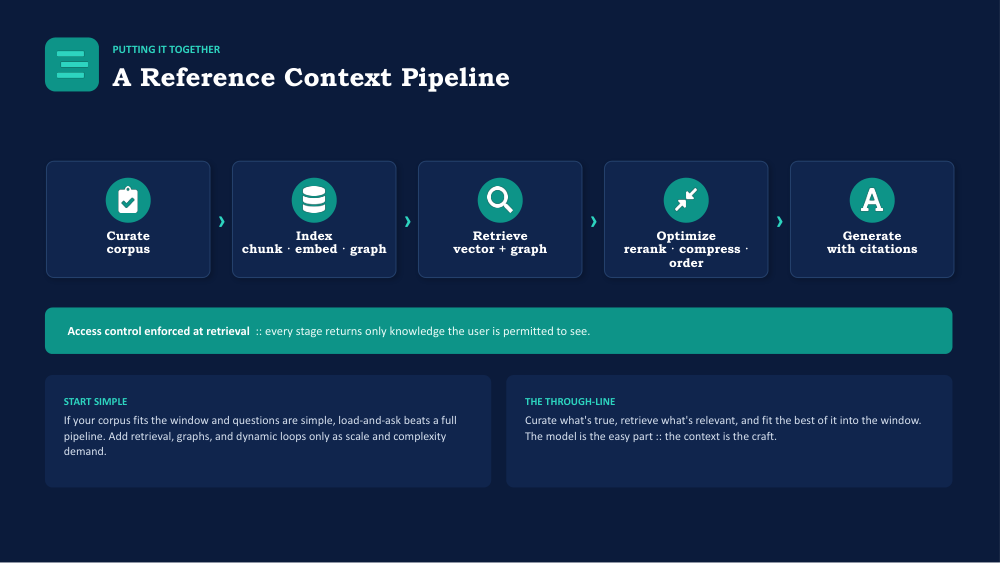
When an agent needs to draw on a large external knowledge base, it can't simply paste the whole thing into its window. Vector databases solve the retrieval half of the problem: documents, conversation history, and structured records are represented as embeddings, so the system can pull back only the handful of passages that are actually relevant to the current step.

Paired with a retrieval-augmented generation (RAG) pipeline, this becomes the mechanism behind "select" — the agent's knowledge base can grow far larger than any context window, because only the relevant slice ever needs to be loaded in.

SLIDE 07 — KNOWLEDGE GRAPHS & GRAPHRAG Knowledge graphs and GraphRAG for structured context retrieval
When flat retrieval isn't enough

Facts that know how they connect

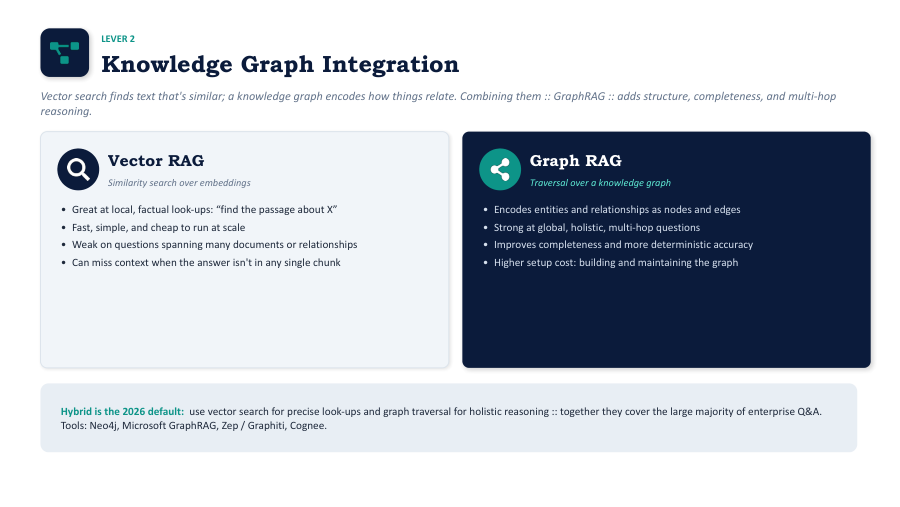
Vector search alone finds passages that read similarly — it doesn't know that a customer's ticket, their subscription tier, and the relevant policy document are all connected. Knowledge graphs model those relationships explicitly, so an agent can traverse from a customer to their tickets to the applicable SLA in one structured hop instead of hoping a similarity search happens to surface all three.

GraphRAG combines the two: graph-aware traversal narrows down the right neighborhood of facts, and retrieval pulls the supporting text — reducing hallucination and giving the agent an explainable trail for multi-step, multi-source questions, particularly useful under access control or compliance requirements.

SLIDE 08 — PATTERNS SEEN IN PRODUCTION Practical context engineering patterns: scratchpad, sub-agents, memory tiers
What this looks like day to day

Three patterns worth borrowing

  • The scratchpad — an agent logs findings to storage outside its window as it works, building a persistent, queryable memory instead of re-reading everything from scratch each turn.
  • Sub-agent isolation — a complex task is split across smaller agents, each with its own narrow, uncontaminated context, with only the final result passed back up.
  • Tiered memory — short-term memory holds the current conversation; long-term memory holds durable facts and preferences, retrieved selectively rather than replayed in full every time.
SLIDE 09 — OWNING THE CONTEXT WINDOW Summary: owning your context window as a core design principle
The principle that ties it together

Treat the window as owned, not infinite

The most durable idea across every framework here — LangChain's four pillars, RAG, knowledge graphs, tiered memory — is the same one articulated in the 12-Factor Agents design principles: an agent architecture should own its context window rather than treat it as a bottomless scratchpad the model will sort out on its own.

That means every design decision about instructions, memory, and retrieval is made deliberately, with a clear owner and a clear budget — not left to whatever happens to fit.

Quick reference

The six types of context, side by side

Context typeWhat it holdsPrimary pillar it feeds
System instructionsRole, goals, constraints, safety rulesWrite
User promptThe specific request and its stated constraintsSelect
Short-term memoryRecent conversation turns, current task stateCompress
Long-term memoryDurable facts, preferences, past sessionsSelect
Retrieved knowledgeDocuments, records, and graph facts pulled via RAGSelect / Compress
Tools & stateAvailable actions and the live state of the environmentIsolate
Frequently asked

Context engineering FAQ

No. Prompt engineering crafts the wording of a single instruction. Context engineering manages the entire information lifecycle an agent draws on — instructions, memory, retrieved knowledge, and tools — across a multi-step task, often spanning multiple sessions. A well-worded prompt still fails if the surrounding context is wrong.

Write (save context outside the active window for later use), Select (retrieve only what's relevant to the current step), Compress (fit more meaning into fewer tokens), and Isolate (prevent unrelated context from contaminating the current task). The framework was popularized by LangChain's agent research.

Knowledge engineering is about structuring and storing information so it can be retrieved — building the vector database or knowledge graph. Context engineering is the layer above it: deciding, at inference time, which pieces of that stored knowledge actually belong in the model's context window right now.

GraphRAG combines a knowledge graph's explicit relationships with retrieval-augmented generation's text lookup. It's worth the added complexity for multi-source or time-bound questions, when data sits under access control, or whenever an agent needs to show an explainable reasoning trail rather than a single similarity-matched passage.

Short-term memory keeps the current conversation coherent turn to turn. Long-term memory persists facts and preferences across sessions, so the agent doesn't relearn the same things every time. Retrieving long-term memory selectively, instead of replaying it in full, is what keeps it from crowding out the current task.

It's a design principle from the 12-Factor Agents methodology: rather than letting a framework silently decide what goes into the model's context, the engineering team deliberately controls what instructions, memory, and retrieved knowledge enter the window at each step — treating it as a managed, finite resource rather than an afterthought.

Get started

Ready to design your agent's context budget?

Start by mapping the six types of context your agent actually needs, then apply Write, Select, Compress, and Isolate to keep the window lean and relevant as tasks grow longer.